Wednesday, 5 February 2014

Method Overloading

  1. In C#, two or more methods within the same class can share the same name, as long as their parameter declarations are different.
  2. These methods are said to be overloaded
  3. The process is referred to as method overloading.
  4. Method overloading is one of the ways to implement polymorphism.
  5. It is not sufficient for two methods to differ only in their return types.
  6. The methods must differ in the types or number of their parameters.
Demonstrate method overloading: different number of parameters

using System; 
 
class Overload {  
  public void ovlDemo() {  
    Console.WriteLine("No parameters");  
  }  
  
  // Overload ovlDemo for one integer parameter.  
  public void ovlDemo(int a) {  
    Console.WriteLine("One parameter: " + a);  
  }  
  
  // Overload ovlDemo for two integer parameters.  
  public int ovlDemo(int a, int b) {  
    Console.WriteLine("Two parameters: " + a + " " + b);  
    return a + b; 
  }  
  
  // Overload ovlDemo for two double parameters.  
  public double ovlDemo(double a, double b) { 
    Console.WriteLine("Two double parameters: " 
                       a + " "+ b);  
    return a + b;  
  }  
}  
  
class MainClass {  
  public static void Main() {  
    Overload ob = new Overload();  
    int resI; 
    double resD;      
  
    // call all versions of ovlDemo()  
    ob.ovlDemo();   
    Console.WriteLine()
 
    ob.ovlDemo(2);  
    Console.WriteLine()
 
    resI = ob.ovlDemo(46);  
    Console.WriteLine("Result of ob.ovlDemo(4, 6): " 
                       resI);  
    Console.WriteLine()
 
 
    resD = ob.ovlDemo(1.12.32);  
    Console.WriteLine("Result of ob.ovlDemo(1.1, 2.32): " 
                       resD)
     console.WriteLine();
  }  
}
Output:
No parameters

One parameter: 2

Two parameters: 4 6
Result of ob.ovlDemo(4, 6): 10

Two double parameters: 1.1 2.32
Result of ob.ovlDemo(1.1, 2.32): 3.42
 Automatic type conversions can affect overloaded method resolution: int, double
using System; 
 
class Overload2 
  public void f(int x) { 
    Console.WriteLine("Inside f(int): " + x)
  
 
  public void f(double x) { 
    Console.WriteLine("Inside f(double): " + x)


class MainClass 
  public static void Main() { 
    Overload2 ob = new Overload2()
 
    int i = 10
    double d = 10.1
 
    byte b = 99
    short s = 10
    float f = 11.5F
 
 
    ob.f(i)// calls ob.f(int) 
    ob.f(d)// calls ob.f(double) 
 
    ob.f(b)// calls ob.f(int) -- type conversion 
    ob.f(s)// calls ob.f(int) -- type conversion 
    ob.f(f)// calls ob.f(double) -- type conversion 
  
}
Output
Inside f(int): 10
Inside f(double): 10.1
Inside f(int): 99
Inside f(int): 10
Inside f(double): 11.5
 Overloaded constructors
Constructor overloading in C# is a type of Static Polymorphism. Using constructor overloading, any number of constructors can be defined for the same class. But ensure each constructor must have different number and type of parameters defined.
public class Car
{
  private string make;
  private string model;
  private string color;
  private int yearBuilt;

  public Car()
  {
    this.make = "Ford";
    this.model = "Mustang";
    this.color = "red";
    this.yearBuilt = 1970;
  }

  public Car(string make)
  {
    this.make = make;
    this.model = "Corvette";
    this.color = "silver";
    this.yearBuilt = 1969;
  }

  public Car(string make, string model, string color, int yearBuilt)
  {
    this.make = make;
    this.model = model;
    this.color = color;
    this.yearBuilt = yearBuilt;
  }

  public void Display()
  {
    System.Console.WriteLine("make = " + make);
    System.Console.WriteLine("model = " + model);
    System.Console.WriteLine("color = " + color);
    System.Console.WriteLine("yearBuilt = " + yearBuilt);
  }

}

class MainClass
{

  public static void Main()
  {
    Car myCar = new Car("Toyota""MR2""black"1995);
    Car myCar2 = new Car();
    Car myCar3 = new Car("Chevrolet");

    System.Console.WriteLine("myCar details:");
    myCar.Display();
    System.Console.WriteLine("myCar2 details:");
    myCar2.Display();
    System.Console.WriteLine("myCar3 details:");
    myCar3.Display();
  }
}
Output
myCar details:
make = Toyota
model = MR2
color = black
yearBuilt = 1995
myCar2 details:
make = Ford
model = Mustang
color = red
yearBuilt = 1970
myCar3 details:
make = Chevrolet
model = Corvette
color = silver
yearBuilt = 1969
This example for Constructor Overloading in C# defines three constructors in class "Car". 
All the overloaded constructors have the same name as the class name Car
The constructors are invoked during instance creation inside Main method of MainClass.
The constructors are triggered using the new operator followed by the class name and the parameters.

 Overriding a method

Method overriding in C# is a feature like the virtual function in C++. Method overriding is a feature that allows you to invoke functions (that have the same signatures) that belong to different classes in the same hierarchy of inheritance using the base class reference. C# makes use of two keywords: virtual and overrides to accomplish Method overriding. 
  • Creating a method in derived class with same signature as a method in base class is called as method overriding.
  • Same signature means methods must have same name, same number of arguments and same type of arguments.
  • Method overriding is possible only in derived classes, but not within the same class.
  • When derived class needs a method with same signature as in base class, but wants to execute different code than provided by base class then method overriding will be used.
  • To allow the derived class to override a method of the base class, C# provides two options, virtual methods and abstract methods. 
using System;
public class Employee {
    private int fAge;

    public Employee() {
        fAge = 21;
    }
    public virtual void setAge(int age) {
        fAge = age;
    }
    public virtual int getAge() {
        return fAge;
    }
}

public class AdultEmployee : Employee {
    public AdultEmployee() {
    }
    override public void setAge(int age) {
        if (age > 21)
            base.setAge(age);
    }
}

class MainClass {
    public static void Main() {
        Employee p = new Employee();
        p.setAge(18);
        AdultEmployee ap = new AdultEmployee();
        ap.setAge(18);
        Console.WriteLine("Employee Age: {0}", p.getAge());
        Console.WriteLine("AdultEmployee Age: {0}", ap.getAge());
    }
}
 

Boxing and Unboxing in c#

Boxing and unboxing is a  essential concept in .NET’s type system.
With Boxing and unboxing one can link between value-types and reference-types by allowing any value of a value-type to be converted to and from type object.
Boxing and unboxing enables a unified view of the type system wherein a value of any type can ultimately be treated as an object.
Converting a value type to reference type is called Boxing. Unboxing is the opposite operation and is an explicit operation.

using System; 
 
class MainClass 
  public static void Main() { 
    int x; 
    object obj; 
 
    x = 10
    obj = x; // box x into an object 
 
    int y = (int)obj; // unbox obj into an int 
    Console.WriteLine(y)
  
}
 Output:
10 

Boxing occurs when passing values
 
using System; 
 
class MainClass 
  public static void Main() { 
    int x; 
    
    x = 10
    Console.WriteLine("Here is x: " + x)
 
    // x is automatically boxed when passed to sqr() 
    x = sqr(x)
    Console.WriteLine("Here is x squared: " + x)
  
 
  static int sqr(object o) { 
    return (int)o * (int)o; 
  
}
 
 Output:
 
Here is x: 10
Here is x squared: 100


How to consume webservices in web application

By using this webservice we can get the user details based on username. For that first create one new web application
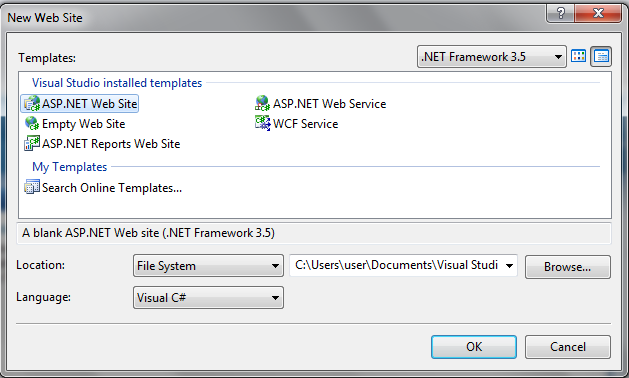
Open visual studio ---> Select File ---> New ---> Web Site ---> select ASP.NET Web Site
 
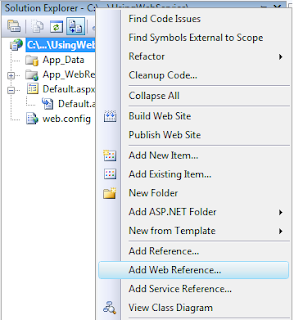
After creation of new website right click on solution explorer and choose “Add web reference” that would be like this  
 
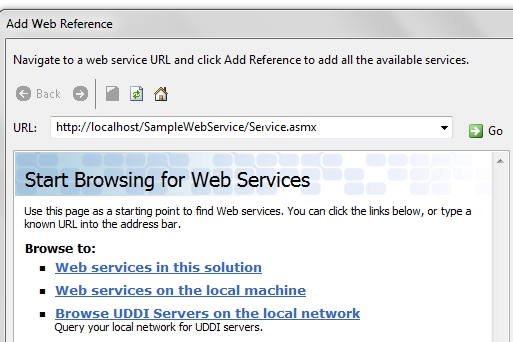
After select Add Web reference option one window will open like this 
 
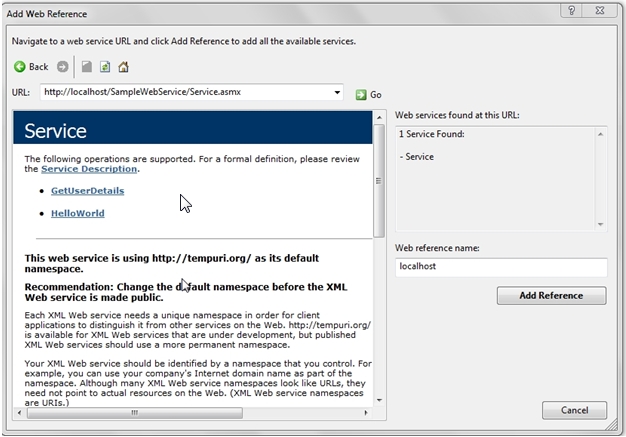
Now enter your locally deployed web service link and click Go button after that your web service will found and window will looks like this 
 
Now click on Add Reference button web service will add successfully. Now open your Default.aspx page and design like this
<html xmlns="http://www.w3.org/1999/xhtml">
<head runat="server">
<title>Getting Data from WebService</title>
</head>
<body>
<form id="form1" runat="server">
<div>
<table>
<tr>
<td>
<b>Enter UserName:</b>
</td>
<td>
<asp:TextBox ID="txtUserName" runat="server"></asp:TextBox>
</td>
<td>
<asp:Button ID="btnSubmit" runat="server" Text="Submit" onclick="btnSubmit_Click" />
</td>
</tr>
</table>
</div>
<div>
<asp:GridView ID="gvUserDetails" runat="server" EmptyDataText="No Record Found">
<RowStyle BackColor="#EFF3FB" />
<FooterStyle BackColor="#507CD1" Font-Bold="True" ForeColor="White" />
<PagerStyle BackColor="#2461BF" ForeColor="White" HorizontalAlign="Center" />
<HeaderStyle BackColor="#507CD1" Font-Bold="True" ForeColor="White" />
<AlternatingRowStyle BackColor="White" />
</asp:GridView>
</div>
</form>
</body>
</html>

Now in code behind add following namespaces
using System.Data;
using System.Xml;

After adding namespaces write the following code in code behind
protected void Page_Load(object sender, EventArgs e)
{
if(!IsPostBack)
{
BindUserDetails("");
}
}
protected void BindUserDetails(string userName)
{
localhost.Service objUserDetails = new localhost.Service(); // you need to create the object of the web service
DataSet dsresult = new DataSet();
XmlElement exelement = objUserDetails.GetUserDetails(userName);
if(exelement!=null)
{
XmlNodeReader nodereader = new XmlNodeReader(exelement);
dsresult.ReadXml(nodereader, XmlReadMode.Auto);
gvUserDetails.DataSource = dsresult;
gvUserDetails.DataBind();
}
else
{
gvUserDetails.DataSource = null;
gvUserDetails.DataBind();   
}
}
protected void btnSubmit_Click(object sender, EventArgs e)
{
BindUserDetails(txtUserName.Text);
}
Now run your application and check output .When you type R, it will display all the student name that start with the letter R.
   Video- This video shows how to consume web service in console application.


Create new webservice application in Asp.net

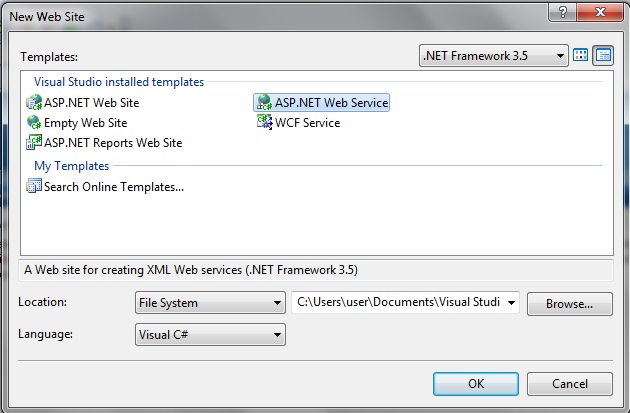
Open visual studio ---> Select File ---> New ---> Web Site ---> select ASP.NET Web Service


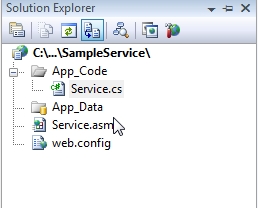
Now our new web service ready our webservice website like this


Now open your Service.cs file in web service website to write the code to get the user details from database
 
Before writing the WebMethod in Service.cs first add following namespaces
 
using System.Xml;
using System.Configuration;
using System.Data;
using System.Data.SqlClient;  
 
After adding namespaces write the following method GetUserDetails in Service.cs page
 
[WebMethod]
public XmlElement GetUserDetails(string userName)
{
SqlConnection con = new SqlConnection(ConfigurationManager.ConnectionStrings["dbconnection"].ToString());
con.Open();
SqlCommand cmd = new SqlCommand("select * from UserInformation where UserName like @userName+'%'", con);
cmd.Parameters.AddWithValue("@userName", userName);
cmd.ExecuteNonQuery();
SqlDataAdapter da = new SqlDataAdapter(cmd);
// Create an instance of DataSet.
DataSet ds = new DataSet();
da.Fill(ds);
con.Close();
// Return the DataSet as an XmlElement.
XmlDataDocument xmldata = new XmlDataDocument(ds);
XmlElement xmlElement = xmldata.DocumentElement;
return xmlElement;
}
 
Here we need to remember one point that is adding [WebMethod] before method definition because we need to access web method pulically otherwise it’s not possible to access method publically. If you observe above code I converted dataset to XmlElement t because sometimes we will get error like return type dataset invalid type it must be either an IListSource, IEnumerable, or IDataSource to avoid this error I converted dataset to XmlElement.
 
Here we need to set the database connection in web.config because here I am getting database connection from web.config  
 
<connectionStrings>
<add name="dbconnection" connectionString="Data Source=SureshDasari;Integrated Security=true;Initial Catalog=MySampleDB"/>
</connectionStrings>
 
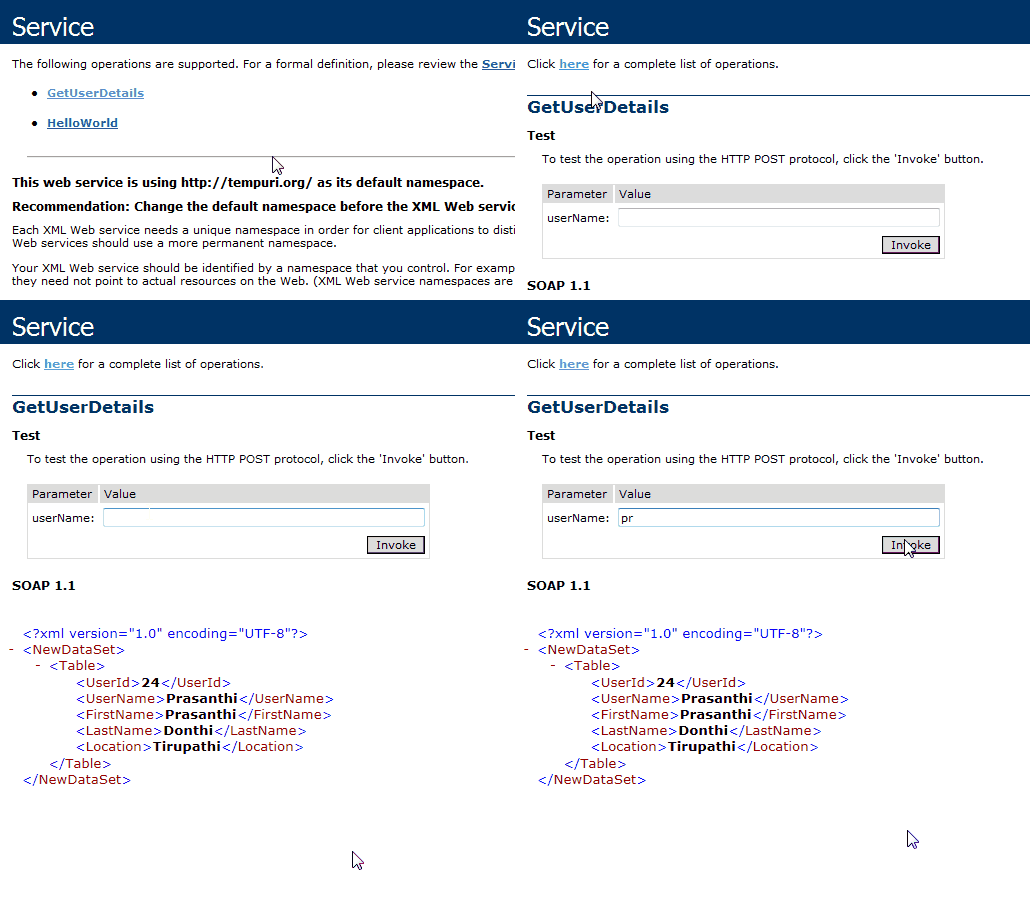
Now run your web service it would be like this 


Our web service is working fine now we need to know how we can use webservice in our application? Before to know about using web service in application first Deploy your webservice application in your local system .


webservice

What is Web Service?

Web Service is an application that is designed to interact directly with other applications over the internet. In simple sense, Web Services are means for interacting with objects over the Internet. The Web serivce consumers are able to invoke method calls on remote objects by using SOAP and HTTP over the Web. WebService is language independent and Web Services communicate by using standard web protocols and data formats, such as
  • HTTP
  • XML
  • SOAP
Advantages of Web Service

Web Service messages are formatted as XML, a standard way for communication between two incompatible system. And this message is sent via HTTP, so that they can reach to any machine on the internet without being blocked by firewall.

Examples for Web Service
Weather Reporting: You can use Weather Reporting web service to display weather information in your personal website.
Stock Quote: You can display latest update of Share market with Stock Quote on your web site.
News Headline: You can display latest news update by using News Headline Web Service in your website.
In summary you can use any web service which is available to use. You can make your own web service and let others use it. Example you can make Free SMS Sending Service with footer with your advertisement, so whosoever use this service indirectly advertise your company... You can apply your ideas in N no. of ways to take advantage of it.
Frequently used word with web services
What is SOAP?
SOAP (simple object access protocol) is a remote function calls that invokes method and execute them on Remote machine and translate the object communication into XML format. In short, SOAP are way by which method calls are translate into XML format and sent via HTTP.
What is WSDL?
WSDL stands for Web Service Description Language, a standard by which a web service can tell clients what messages it accepts and which results it will return.
WSDL contains every detail regarding using web service and Method and Properties provided by web service and URLs from which those methods can be accessed and Data Types used.
What is UDDI?
UDDI allows you to find web services by connecting to a directory.
What is Discovery or .Disco Files?
Discovery files are used to group common services together on a web server. Discovery files .Disco and .VsDisco are XML based files that contains link in the form of URLs to resources that provides discovery information for a web service. Disco File contains URL for the WSDL, URL for the documentation and URL to which SOAP messages should be sent.